这一篇是“如何利用AOP简化MVVM中Model和ViewModel的设计”一文的姊妹篇。阅读本文之前,请一定要先阅读上一篇,否则你可能对有关问题理解不深。
上一篇说到,我们可以用AOP的方式,具体来说,我们使用了一个第三方的框架(PostSharp)来实现了代码注入。PostSharp的方式是静态注入,它是需要改变IL代码的。
请看下面这个截图,Customer类型里面的IL代码其实是被改过的。PostSharp会改变Visual Studio的编译行为。

除了用这种方式之外,是否有其他方法呢?其实是有,我这一篇就给大家介绍另外一种做法:使用微软官方提供的Enterprise Library中的Interception功能(由Unity提供的拦截功能)
关于Enterprise Library的介绍和下载,请访问下面的地址
本文演示的例子,是基于Enterprise Library 5.0
我们来看下面的例子。假如我们还有一个Model类型,叫Order,表示订单。我们希望它的代码能像下面这样简练。
using System;namespace WPFMVVMSample.Models{ public class Order:ModelBase { public int OrderID { get; set; } public DateTime OrderDate { get; set; } }}
【注意】我们这里只继承了ModelBase,没有其他任何特别的东西。
请放心,我们可以做到。你只要继续往下读就可以了。
1. 添加引用
我们需要引用一个程序集

2. 编写一个InterceptionBehavior
Behavior是指我们需要注入的一种行为。这是Interception中的专业术语。
【注意】这一篇文章不是专门来讲Policy Injection的,有兴趣的朋友,可以参考Enterprise Library中的说明文档
using System.Linq;using Microsoft.Practices.Unity.InterceptionExtension;namespace WPFMVVMSample{    public class NotifyPropertyChangedBahavior:IInterceptionBehavior    {        public System.Collections.Generic.IEnumerable

   GetRequiredInterfaces()        {
  return Enumerable.Empty

   ();        }
   public IMethodReturn Invoke(IMethodInvocation input, GetNextInterceptionBehaviorDelegate getNext)        {            var result= getNext()(input, getNext);
   //先执行方法            var methodName = input.MethodBase.Name;            var type = input.Target.GetType();            var targetMethod = type.GetMethod(
   "OnPropertyChanged",                System.Reflection.BindingFlags.NonPublic | System.Reflection.BindingFlags.Instance);
   if (methodName.StartsWith(
   "set_") && targetMethod !=
   null)
   //只针对这种方法器进行注入            {                var propertyName = methodName.Substring(4);
   //解析得到属性名称                targetMethod.Invoke(input.Target,
   new[] { propertyName });
   //执行该方法            }
   return result;        }
   public
   bool WillExecute        {            get {
   return
   true; }        }    }}
【注意】上述代码与之前用PostSharp的做法是很相似的,不是吗
3. 修改ModelBase类型
Unity默认提供的Intercept,支持两种主要的拦截器:TransparentProxyInterceptor和VirtualMethodInterceptor。我们这里准备用第一种。它有一个简单要求,就是需要拦截的类型,继承MarshalByRefObject即可
代码修改如下
using System;using System.ComponentModel;using System.Diagnostics;namespace WPFMVVMSample.Models{ public abstract class ModelBase : MarshalByRefObject, INotifyPropertyChanged { public event PropertyChangedEventHandler PropertyChanged; protected void OnPropertyChanged(string name) { if (PropertyChanged != null) PropertyChanged(this, new PropertyChangedEventArgs(name)); //为了便于调试,我们在Output窗口输出一行信息 Debug.WriteLine(string.Format("{0} Changed", name)); } }} 4.编写代码实现拦截和注入
using System;using System.Windows;using Microsoft.Practices.Unity.InterceptionExtension;namespace WPFMVVMSample{    ///


      /// Interaction logic for MainWindow.xaml    ///     public partial class MainWindow : Window    {        public MainWindow()        {            InitializeComponent();            Loaded += new RoutedEventHandler(MainWindow_Loaded);        }        void MainWindow_Loaded(object sender, RoutedEventArgs e)        {            var order = Intercept.ThroughProxy(new Models.Order(),                new TransparentProxyInterceptor(),                new[] { new NotifyPropertyChangedBahavior() });            order.OrderDate = DateTime.Now;            order.OrderID = 5;                    }    }}
请注意,这里不能再直接用new的方式创建Order的实例,而是需要通过Intercept来创建。
按下F5进行调试,我们同样可以在Output窗口看到有关的消息输出,这说明那个自定义Behavior在起作用,因为是它在调用基类中那个OnPropertyChanged方法

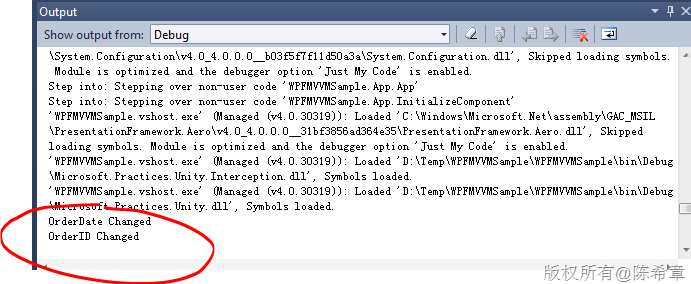
值得一提的是,与PostSharp不同,我们这里使用的Interception,是动态拦截,它不会修改我们的代码。请看Order这个类型的代码,与我们在Visual Studio里面是一样的


没有评论:
发表评论